Showing posts with label linux. Show all posts

Wednesday, December 6, 2017

ksplice configuration in OEL ( Oracle Enterprise Linux) for uninterrupted updates

Ksplice is a tool from oracle which will help you to configure patches without downtime.This tool is very much usefull where SLA needs to be maintained with less downtime. But one important thing major kernel changes cannot be performed using ksplice and it will pushes the patches to the current active kernels.

First we need to register the server to oracle ULN network ( Unbreakable Linux) 

  •  Type the command "up2date --register" as root and it will prompt you to enter your ULN credentials which is received from oracle in below screen.including the CSI number 


  •  Select "next" option 1 by 1 in below screens 


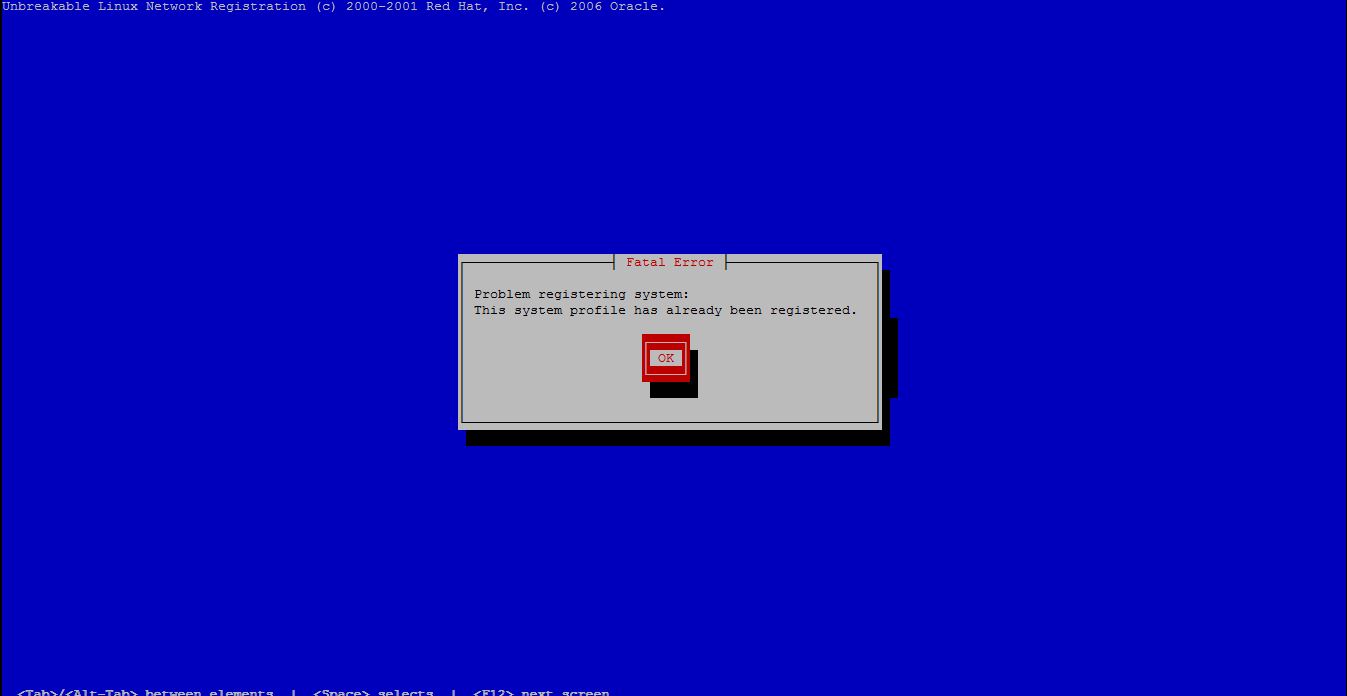
  • Some time you will get the popup as system is already registered if it is not registered already, we have a work around for this issue which i will show you below 


type the below command as root and copy the uuid of the system 

[root@unixchips01 ~]#  /usr/bin/uuidgen -r
1ba9f165-9357-451e-ad48-b19d500bf5d1

edit the etc/sysconfig/rhn/up2date-uuid and update the copied uuid as below format (comment the old uuid)

[root@unixchips01 ~]# vi /etc/sysconfig/rhn/up2date-uuid
#rhnuuid=91d0junk-1538-11db-8f59-123bdba2bb0f
rhnuuid=1ba9f165-9357-451e-ad48-b19d500bf5d1

Now run the "up2date --register" command again and it will allow you to register the system in ULN network 


  • Now we need to download the ksplice and install it 

*********************************************************************************
[root@unixchips01 ~]# wget -N https://www.ksplice.com/uptrack/install-uptrack
--2017-12-06 15:35:49--  https://www.ksplice.com/uptrack/install-uptrack
Resolving www.ksplice.com... 137.254.56.32
Connecting to www.ksplice.com|137.254.56.32|:443... connected.
HTTP request sent, awaiting response... 200 OK
Length: 10218 (10.0K) [text/plain]
Saving to: `install-uptrack'

100%[==============================================================================================================================>] 10,218      --.-K/s   in 0.09s

2017-12-06 15:35:50 (113 KB/s) - `install-uptrack' saved [10218/10218]
*********************************************************************************
  • Once you download the script called install-uptrack provide the executable permission and install using below command  (where the id is the ksplice id which is received while purchasing the support) 
[root@unixchips01 ~]# sh install-uptrack 82d8fa9a78789cb865948f246723250a924052b64e7b8364e63991576747dd27
[ Release detected: ol ]
--2017-12-06 15:36:09--  https://www.ksplice.com/yum/uptrack/ol/ksplice-uptrack-release.noarch.rpm
Resolving www.ksplice.com... 137.254.56.32
Connecting to www.ksplice.com|137.254.56.32|:443... connected.
HTTP request sent, awaiting response... 200 OK
Length: 6876 (6.7K) [application/x-rpm]
Saving to: `ksplice-uptrack-release.noarch.rpm'

100%[==============================================================================================================================>] 6,876       --.-K/s   in 0.09s

2017-12-06 15:36:09 (76.4 KB/s) - `ksplice-uptrack-release.noarch.rpm' saved [6876/6876]

[ Installing Uptrack ]
warning: ksplice-uptrack-release.noarch.rpm: Header V3 DSA signature: NOKEY, key ID 16c083cd
Preparing packages for installation...
ksplice-uptrack-release-1-3
Loaded plugins: rhnplugin, security
This system is receiving updates from ULN.
ksplice-uptrack                                                                                                                                  |  951 B     00:00
ksplice-uptrack/primary                                                                                                                          | 8.6 kB     00:00
ksplice-uptrack                                                                                                                                                   44/44
ol5_x86_64_UEK_latest                                                                                                                            | 1.2 kB     00:00
ol5_x86_64_UEK_latest/primary                                                                                                                    |  32 MB     00:33
ol5_x86_64_UEK_latest                                                                                                                                           686/686
ol5_x86_64_ksplice                                                                                                                               | 1.2 kB     00:00
ol5_x86_64_ksplice/primary                                                                                                                       | 354 kB     00:00
ol5_x86_64_ksplice                                                                                                                                            3543/3543
ol5_x86_64_latest                                                                                                                                | 1.4 kB     00:00
ol5_x86_64_latest/primary                                                                                                                        |  29 MB     00:31
ol5_x86_64_latest: [############################################                                                                                           ] 5181/15734

ol5_x86_64_latest                                                                                                                                           15734/15734
Setting up Install Process
Resolving Dependencies
--> Running transaction check
---> Package uptrack.noarch 0:1.2.47-0.el5 set to be updated
--> Processing Dependency: uptrack-python-pycurl for package: uptrack
--> Processing Dependency: uptrack-PyYAML for package: uptrack
--> Running transaction check
---> Package uptrack-PyYAML.x86_64 0:3.08-4.el5 set to be updated
--> Processing Dependency: uptrack-libyaml >= 0.1.3-1 for package: uptrack-PyYAML
---> Package uptrack-python-pycurl.x86_64 0:7.15.5.1-4.el5 set to be updated
--> Running transaction check
---> Package uptrack-libyaml.x86_64 0:0.1.4-1.el5 set to be updated
--> Finished Dependency Resolution

Dependencies Resolved

========================================================================================================================================================================
 Package                                       Arch                           Version                                  Repository                                  Size
========================================================================================================================================================================
Installing:
 uptrack                                       noarch                         1.2.47-0.el5                             ksplice-uptrack                            667 k
Installing for dependencies:
 uptrack-PyYAML                                x86_64                         3.08-4.el5                               ol5_x86_64_ksplice                         164 k
 uptrack-libyaml                               x86_64                         0.1.4-1.el5                              ksplice-uptrack                             52 k
 uptrack-python-pycurl                         x86_64                         7.15.5.1-4.el5                           ol5_x86_64_ksplice                          31 k

Transaction Summary
========================================================================================================================================================================
Install       4 Package(s)
Upgrade       0 Package(s)

Total download size: 914 k
Downloading Packages:
(1/4): uptrack-python-pycurl-7.15.5.1-4.el5.x86_64.rpm                                                                                           |  31 kB     00:00
(2/4): uptrack-libyaml-0.1.4-1.el5.x86_64.rpm                                                                                                    |  52 kB     00:00
(3/4): uptrack-PyYAML-3.08-4.el5.x86_64.rpm                                                                                                      | 164 kB     00:00
(4/4): uptrack-1.2.47-0.el5.noarch.rpm                                                                                                           | 667 kB     00:01
------------------------------------------------------------------------------------------------------------------------------------------------------------------------
Total                                                                                                                                   308 kB/s | 914 kB     00:02
Running rpm_check_debug
Running Transaction Test
Finished Transaction Test
Transaction Test Succeeded
Running Transaction
  Installing     : uptrack-python-pycurl                                                                                                                            1/4
  Installing     : uptrack-libyaml                                                                                                                                  2/4
  Installing     : uptrack-PyYAML                                                                                                                                   3/4
  Installing     : uptrack                                                                                                                                          4/4
There are no existing modules on disk that need basename migration.

Installed:
  uptrack.noarch 0:1.2.47-0.el5

Dependency Installed:
  uptrack-PyYAML.x86_64 0:3.08-4.el5                 uptrack-libyaml.x86_64 0:0.1.4-1.el5                 uptrack-python-pycurl.x86_64 0:7.15.5.1-4.el5

Complete!

  • Also you can see the updates pending for installation as below 
Effective kernel version is 2.6.39-400.297.3.el5uek
The following steps will be taken:
Install [suh79ofj] Correctly clear garbage data on the kernel stack when handling signals.
Install [1sh67r01] CVE-2017-1000364: Increase stack guard size to 1 MiB.
Install [am4utewl] CVE-2015-2686: Privilege escalation in sendto() and recvfrom() syscalls.
Install [6ex4rf8z] CVE-2015-4167: Memory corruption when mounting malformed UDF disk images.
Install [bid2es5g] CVE-2017-7273: Denial-of-service in Crypress USB HID driver.
Install [houxosz2] CVE-2015-1465: Denial of service in IPv4 packet forwarding.
Install [iwxmcukh] CVE-2014-9710: Privilege escalation in Btrfs when replacing extended attributes.
Install [5kb8dcqi] CVE-2017-9242: Denial-of-service when using send syscall of IPV6 socket.
Install [h6osusrl] CVE-2016-9604: Permission bypass when creating key using keyring subsystem.
Install [bb8dm7ft] CVE-2016-9685: Memory leak in XFS filesystem operations.
Install [dsja5i0v] CVE-2016-10200: Denial-of-service when creating L2TP sockets using concurrent thread.
Install [f4bfciaj] CVE-2017-1000365: Privilege escalation when performing exec.
Install [t7upxzml] CVE-2017-12134, XSA-229: Privilege escalation in Xen block IO requests.
Install [j9s7zjzf] CVE-2017-1000251: Stack overflow in Bluetooth L2CAP config buffer.
Install [4h95f4sm] CVE-2017-1000253: Privilege escalation via stack overflow in PIE binaries.
Install [n5hdfyhm] CVE-2017-1000111: Privilege escalation when setting options on AF_PACKET socket.
Install [c8t1eenj] CVE-2017-7542: Buffer overflow when parsing IPV6 fragments header.
Install [4p5x4q18] CVE-2017-11176: Use-after-free in message queue notify syscall.
Install [7ycabyox] CVE-2017-14489: NULL pointer dereference in the SCSI transport layer.
Install [fpz4et19] CVE-2017-10661: Data race when canceling timer file descriptors causes denial-of-service.
Install [5qajgmai] CVE-2017-9075: Denial-of-service in SCTPv6 sockets.
Install [gczn7k1y] CVE-2017-9077: Denial-of-service in TCPv6 sockets.
Install [qvq8bn89] CVE-2017-9074: Information leak via ipv6 fragment header.
Install [ew4sffpv] CVE-2017-1000380: Information leak when reading timer information from ALSA devices.
Install [36v62nbc] CVE-2017-7308: Memory corruption in AF_PACKET socket options.
Install [56lrpsgc] CVE-2016-10044: Permission bypass when setting up an async io filesystem.
Install [7plhqvh9] CVE-2017-9074: Denial-of-service when using Generic Segmentation Offload on IPV6 socket.
Install [clznw6t3] CVE-2017-8831: Denial-of-service when using NXP SAA7164 video driver.


  • We can install the updates of the current kernel using the command "uptrack-upgrade -y"
[root@unixchips01 ~]# uptrack-upgrade -y
The following steps will be taken:
Install [suh79ofj] Correctly clear garbage data on the kernel stack when handling signals.
Install [1sh67r01] CVE-2017-1000364: Increase stack guard size to 1 MiB.
Install [am4utewl] CVE-2015-2686: Privilege escalation in sendto() and recvfrom() syscalls.
Install [6ex4rf8z] CVE-2015-4167: Memory corruption when mounting malformed UDF disk images.
Install [bid2es5g] CVE-2017-7273: Denial-of-service in Crypress USB HID driver.
Install [houxosz2] CVE-2015-1465: Denial of service in IPv4 packet forwarding.
Install [iwxmcukh] CVE-2014-9710: Privilege escalation in Btrfs when replacing extended attributes.
Install [5kb8dcqi] CVE-2017-9242: Denial-of-service when using send syscall of IPV6 socket.
Install [h6osusrl] CVE-2016-9604: Permission bypass when creating key using keyring subsystem.
Install [bb8dm7ft] CVE-2016-9685: Memory leak in XFS filesystem operations.
Install [dsja5i0v] CVE-2016-10200: Denial-of-service when creating L2TP sockets using concurrent thread.
Install [f4bfciaj] CVE-2017-1000365: Privilege escalation when performing exec.
Install [t7upxzml] CVE-2017-12134, XSA-229: Privilege escalation in Xen block IO requests.
Install [j9s7zjzf] CVE-2017-1000251: Stack overflow in Bluetooth L2CAP config buffer.
Install [4h95f4sm] CVE-2017-1000253: Privilege escalation via stack overflow in PIE binaries.
Install [n5hdfyhm] CVE-2017-1000111: Privilege escalation when setting options on AF_PACKET socket.
Install [c8t1eenj] CVE-2017-7542: Buffer overflow when parsing IPV6 fragments header.
Install [4p5x4q18] CVE-2017-11176: Use-after-free in message queue notify syscall.
Install [7ycabyox] CVE-2017-14489: NULL pointer dereference in the SCSI transport layer.
Install [fpz4et19] CVE-2017-10661: Data race when canceling timer file descriptors causes denial-of-service.
Install [5qajgmai] CVE-2017-9075: Denial-of-service in SCTPv6 sockets.
Install [gczn7k1y] CVE-2017-9077: Denial-of-service in TCPv6 sockets.
Install [qvq8bn89] CVE-2017-9074: Information leak via ipv6 fragment header.
Install [ew4sffpv] CVE-2017-1000380: Information leak when reading timer information from ALSA devices.
Install [36v62nbc] CVE-2017-7308: Memory corruption in AF_PACKET socket options.
Install [56lrpsgc] CVE-2016-10044: Permission bypass when setting up an async io filesystem.
Install [7plhqvh9] CVE-2017-9074: Denial-of-service when using Generic Segmentation Offload on IPV6 socket.
Install [clznw6t3] CVE-2017-8831: Denial-of-service when using NXP SAA7164 video driver.
Installing [suh79ofj] Correctly clear garbage data on the kernel stack when handling signals.
Installing [1sh67r01] CVE-2017-1000364: Increase stack guard size to 1 MiB.
Installing [am4utewl] CVE-2015-2686: Privilege escalation in sendto() and recvfrom() syscalls.
Installing [6ex4rf8z] CVE-2015-4167: Memory corruption when mounting malformed UDF disk images.
Installing [bid2es5g] CVE-2017-7273: Denial-of-service in Crypress USB HID driver.
Installing [houxosz2] CVE-2015-1465: Denial of service in IPv4 packet forwarding.
Installing [iwxmcukh] CVE-2014-9710: Privilege escalation in Btrfs when replacing extended attributes.
Installing [5kb8dcqi] CVE-2017-9242: Denial-of-service when using send syscall of IPV6 socket.
Installing [h6osusrl] CVE-2016-9604: Permission bypass when creating key using keyring subsystem.
Installing [bb8dm7ft] CVE-2016-9685: Memory leak in XFS filesystem operations.
Installing [dsja5i0v] CVE-2016-10200: Denial-of-service when creating L2TP sockets using concurrent thread.
Installing [f4bfciaj] CVE-2017-1000365: Privilege escalation when performing exec.
Installing [t7upxzml] CVE-2017-12134, XSA-229: Privilege escalation in Xen block IO requests.
Installing [j9s7zjzf] CVE-2017-1000251: Stack overflow in Bluetooth L2CAP config buffer.
Installing [4h95f4sm] CVE-2017-1000253: Privilege escalation via stack overflow in PIE binaries.
Installing [n5hdfyhm] CVE-2017-1000111: Privilege escalation when setting options on AF_PACKET socket.
Installing [c8t1eenj] CVE-2017-7542: Buffer overflow when parsing IPV6 fragments header.
Installing [4p5x4q18] CVE-2017-11176: Use-after-free in message queue notify syscall.
Installing [7ycabyox] CVE-2017-14489: NULL pointer dereference in the SCSI transport layer.
Installing [fpz4et19] CVE-2017-10661: Data race when canceling timer file descriptors causes denial-of-service.
Installing [5qajgmai] CVE-2017-9075: Denial-of-service in SCTPv6 sockets.
Installing [gczn7k1y] CVE-2017-9077: Denial-of-service in TCPv6 sockets.
Installing [qvq8bn89] CVE-2017-9074: Information leak via ipv6 fragment header.
Installing [ew4sffpv] CVE-2017-1000380: Information leak when reading timer information from ALSA devices.
Installing [36v62nbc] CVE-2017-7308: Memory corruption in AF_PACKET socket options.
Installing [56lrpsgc] CVE-2016-10044: Permission bypass when setting up an async io filesystem.
Installing [7plhqvh9] CVE-2017-9074: Denial-of-service when using Generic Segmentation Offload on IPV6 socket.
Installing [clznw6t3] CVE-2017-8831: Denial-of-service when using NXP SAA7164 video driver.
Your kernel is fully up to date.


Now your system is fully updated with current kernel and we can check the changes in the current kernel version also


  • We can check the system status using the below weblink with your oracle support credentials 

https://status-ksplice.oracle.com/status/


Tuesday, April 4, 2017

Unix - Command reference for different OS

1. Server Release info

Solaris: cat /etc/release

RHEL: cat /etc/enterprise-release , cat /etc/redhat-release, lsb_release -a , cat /proc/version

HP-UX: /stand/kernrel

AIX- oslevel -r

2.Server type ( platform)  

Solaris : /usr/platform/`uname -i`/sbin/prtdiag -v

RHEL: dmidcode

HP-UX: model , uname -a

AIX-prtconf | grep -i 'System Model'

3. Hardware info 

Solaris: prtdiag -v , prtconf -D ,prtpicl -v [-c <class>]

RHEL: lspci, lsusb,lshal

HP-UX: ioscan, ioscan -fun [disk|tape|lan] , /opt/ignite/bin/print_manifest , cat /var/opt/ignite/local/manifest/manifest.info

AIX : lscfg -v , lscfg -l ent0 , lscfg -vl fcs0 (find the WWN of HBA adapter) , lsdev , lsdev -Cc disk , lsdev -Cc disk -p scsi0, lsslot -c [pci|phb|port], lsslot -c pci -l ent0, lspath -l hdisk0, diag

4. Operating system ( kernel details)

Solaris: uname -a

RHEL: uname -a

HP-UX: uname -a

AIX: oslevel [-r|-s]
 
5.Memory 

Solaris:/usr/platform/`uname -i`/sbin/prtdiag -v prtconf |grep -i mem

RHEL: cat /proc/meminfo , free -om , cat /proc/slabinfo

HP-UX: dmesg | grep - physical , /usr/sam/lbin/getmem , /opt/ignite/bin/print_manifest , cat /var/opt/ignite/local/manifest/manifest.info

AIX: prtconf -m , prtconf |grep -i memory , lsattr -El sys0 -a realmem , bootinfo -r

6. CPU ( type , number) 

Solaris: /usr/platform/`uname -i`/sbin/prtdiag -v , psrinfo , paradm -f 0 (offline) , psradm -n 0 (online)

RHEL : cat /proc/cpuinfo


HP-UX: /opt/ignite/bin/print_manifest .
sam -> performance monitors -> system properties
cat /var/opt/ignite/local/manifest/manifest.info

AIX: prtconf |grep -i processor

7.Disk Drives 

Solaris: Format , prtvtoc <device> , format -e (to convert EFI (zfs) to SMI)

RHEL: fdisk -l , parted , partprobe -s < device> , smartctl -a < device> 

HP-UX: oscan -funC disk

AIX: lsdev -Cc disk , lsdev -Cc disk -p scsi0 (specific controller) , lsdev -Cc disk -S [a|d|s] (available, defined, stopped) , lscfg -v -l hdisk0

8. Kernel file and associated directories

Solaris:/kernel/genunix, /platform/`uname -m`/kernel, /kernel , /usr/kernel

RHEL:boot/initrd.?????.img , /boot/vmlinuz

HP-UX: - /stand/vmunix

AIX:/unix , /usr/lib/boot , /usr/lib/drivers, /usr/lib/boot/unix_64

(/unix is the symbolic link to /usr/lib/boot/unix_64)

9.Kernel Architecture ( 32/64)

Solaris: isainfo -kv (solaris 9+) , isainfo -b

RHEL: uname -a , uname -m , getconf -a |grep -i 'long_bit' , cat /proc/version

HP-UX: getconf KERNEL_BITS ( version 11) , /opt/ignite/bin/print_manifest |grep -i 'os mode' 
/opt/ignite/bin/print_manifest |grep -i 'hw capability'

AIX: prtconf -k , bootinfo -K

10 .Display firmware 

Solaris:At the OK prompt type banner

RHEL: boot into the BIOS (normally F2 or F12)

HP-UX: 
reboot
enter PDC
type: IN (information menu)
type: FV (Firmware Version)

AIX:prtconf |grep -i firmware , lscfg -pv , invscout 

11. Memory Page size

Solaris: /usr/bin/pagesize

RHEL : /usr/bin/getconf -a| egrep -i 'pagesize|page_size'

HP-UX: dmesg |grep -i physical

AIX:pagesize , pagesize -a (display all supported pagesizes)

12.Swap Display

Solaris:swap -l , swap -s 

RHEL: cat /proc/swaps (detailed) , swapon -s

HP-UX:
swapinfo (displayed in KB)
swapinfo -m (display in Mb)
swapinfo -tm (total / Mb)

AIX:lsps -a (detailed) , lsps -s

13. Adding Swap 

Solaris:

mkfile 5m /var/swapfile
swap -a /var/swapfile
update /etc/vfstab

RHEL:

create partition with fdisk (type 82)
file(create 50MB swap file):
dd if=/dev/zero of=/var/swapfile bs=1024 count=50000

mkswap <device>|<file>
swapon <device>|<file>

update /etc/fstab

HP-UX:

Create logical volume or filesystem

swapon <device> | -f <logical device>
swapon -p 3 <device> | -f <logical device>

update /etc/fstab

AIX:

mkps -a -s 4 -n <volume group>

# change the attributes
chps -a n paging00 (don't use after restart)

# change the logical volume attributes (name in this case)
chlv -n <new name> <old old> (chang page space name) 
also see /etc/swapspaces file

14. Removing the swap 

Solaris:

update /etc/vfstab
swap -d

RHEL:wapoff <device>|<file> , Remove device or file as normal

HP-UX: 
remove entry from /etc/fstab
reboot

AIX:

swapoff /dev/paging00
rmps paging00 


15. Disk Serial Number & Type 

Solaris:

format
iostat -En
luxadm inq <disk> (A5x00 disk arrays)

RHEL:

hdparm -i /dev/hda
hdparm -I /dev/hda (detailed)

hdparm -Tt /dev/hda (speed test)

sdparm -i /dev/sdb

cat /proc/ide/ide0/hda/model
cat /proc/scsi/scsi

HP-UX:

diskinfo -v /dev/rdsk/c0t4d0 (detailed but no serial number)
/opt/ignite/bin/print_manifest (no serial number)

## Insure that the online diagnostic support tools have been installed
swlist -l bundle | grep 'Support Tools'


## Command-Line Support Tools Manager (cstm)
## The run cstm
cstm
cstm> map
cstm> sel dev 4 (select the disk of you choice)
cstm> info
cstm> il (obtain the serial number)
cstm> quit 

AIX:

scfg -vl hdisk0
lscfg -vl hdisk*

16. Disk partitions 

Solaris:

prtvtoc <device>
cat /etc/vfstab

RHEL:

fdisk -l
sfdisk -l (advanced server)

cat /proc/partitions (very high level)
cat /etc/fstab

HP-UX:

lvlnboot -v /dev/vg00 
lifls -Clv <device>

# Display the LIF contents
lifcp /dev/dsk/c0t6d0:AUTO -

cat /etc/fstab

Note: Boot programs are stored in the boot area in Logical Interchange Format (LIF), which is similar to a file system. For a device to be bootable, the LIF volume on that device must contain at least the ISL
(the initial system loader) and HPUX (the HP-UX bootstrap utility) LIF files. ISL is like GRUB.

AIX:

lsvg -l rootvg 
lchangelv

cat /etc/filesystems

17.List row partitions 

Solaris:

use format to partition the disk then just use the slice as a raw partition, remember to use the character device

RHEL:

## Old way
/etc/sysconfig/rawdevices
service rawdevices start
chkconfig rawdevices on

## New way, Edit below file
/etc/udev/rules.d/60-raw.rules
udevinfo -d or udevadm info

## Display raw partitions
raw -qa

HP-UX:

Just create a new LVOL without a filesystem - that's it.

AIX:

Just create a new LVOL without a filesystem

# create a raw volume
mklv -y rawVolume vg01 10

18.Bad blocks

Solaris:
format (use analyse )

RHEL:
badblocks

HP-UX:
dd if=/dev/rdsk/cXtYd0 of=/dev/null bs=1024K

Note: no errors means disk is good

AIX:

chlv -b [y|n] <lv>

Note: enables bad block relocation

19.File system commands

Solaris:
df -k
df -h

RHEL:
df -k
df -h

HP-UX:
bdf
df [-egiklnvfb]

AIX:
df -k 
lsfs [<filesystem>]
lsfs -q <filesystem> (detailed) 


20. File system create and remove 

Solaris:

newfs -v <raw device>

# Display how the filesystem was created
newfs -Nv <filesystem>

RHEL:

mkfs -t ext3 /dev/sdb1
mke2fs -t ext4 /dev/sdb1

# all point to mke2fs
mkfs.ext2
mkfs.ext3
mkfs.ext4

cat /etc/mke2fs.conf

HP-UX:

newfs -F vxfs -o largefiles /dev/vg01/rlvol1

mkfs -F vxfs -o largefiles /dev/vg01/rlvol1

Note: mkfs and newfs are a pointer to /sbin/fs_wrapper 

AIX:
crfs -v jfs2 -d data02lv -m /data02 -A yes

-v filesystem type
-d device or logical volume
-m mountpoint
-A mount after restart [yes|no]

rmfs -ri /data02

-r remove the mountpoint
-i display warning before removing

chfs -a size=+1G /var (grow by additional 1GB)
chfs -a size=1G /var (grow to 1GB in size) 

21. Tune file systems 

Solaris:
tunefs
fstyp -v <device> |grep -i minfree

RHEL:
tune2fs
tune2fs -l /dev/sda1

# change reserved blocks percentage to 1%
tune2fs -m 1 /dev/sda1

HP-UX:
tunefs -v <filesystem>
vxtunefs -v <filesystem>
fstyp -v <filesystem>

# Disk fragmentation
fsadm -F vxfs -E / (report)
fsadm -F vxfs -e / (defrag)

AIX:
chfs

Note: you can perform the following
resize
freeze
change mountpoint
permissions

22.Force fsck

Solaris:
# Check to see filesystem needs checking
fstyp -v <filesystem> | grep fsclean

RHEL:
touch /forcefsck
shutdown -Fr now
fsck.mode=force (kernel parameter)
tune2fs -l /dev/sdb<?> |grep -i 'filesystem state'

HP-UX:
# Look at the second line to see if a filesystem
# needs checking
tunefs -v <filesystem>

AIX:

No options 

23.backup filesystem

Solaris:
ufsdump|ufsrestore
tar
dd
cpio

RHEL:
dump/restore
tar
dd
cpio

HP-UX:
fbackup/frecover
dump/restore
ftio
tar
dd
cpio

AIX:
backup|restore
tar
dd
cpio

24. Display the boot device 

Solaris:
eeprom |grep boot-device
prtconf -pv |grep bootpath
prtpicl -v|grep ':bootpath'

RHEL:
cat /boot/grub/grub.conf

HP-UX:
setboot

AIX:
bootinfo -b (display last boot device)
bootlist -m [normal|service] -o (display bootable devices)

25. Setting boot device 

Solaris:
setenv boot-device [<device>|<alias>]
eeprom boot-device [<device>|<alias>]

RHEL:
/boot/grub/grub.conf

HP-UX:
setboot -p <primary path>
setboot -a <alternate path>

# autoboot sequnce
setboot -b [on|off]

AIX:
bootlist -m normal hdisk0 hdisk1

26. Create a boot disk 

Solaris: Not available

RHEL:mkbootdisk `uname -r` (boot diskette)

HP-UX: 
recovery tape (preview)
make_tape_recovery -v -l -x inc_entire=vg00
/opt/ignite/bin/make_recovery -ACv

AIX:mksysb 

27. boot cdrom/diskette (single user)

Solaris:
ok> boot cdrom -s


RHEL: Type s or 1 at the end of the grub line

HP-UX: 

enter PDC
> search
>boot p1 (cdrom)
interact with IPL? Y
ISL> hpux -is

AIX:

based on a 9114-275 workstation

Restart the machine.
Wait the the AIX splash screen to come up. Devices begin to initialize here.
When you see the [keyboard] word on screen hit the F5 button or the 5 key depending on your console.
Choose “default boot list ” when the maintenance screen comes up.

28. Boot in to maintenance mode 

Solaris:
ok> boot -as

RHEL:
f10 or f12

HP-UX:
>boot pri
interact with IPL? Y
ISL> hpux -lm

AIX:
based on a 9114-275 workstation

Restart the machine.
Wait the the AIX splash screen to come up. Devices begin to initialize here.
When you see the [keyboard] word on screen hit the F5 button or the 5 key depending on your console.
Choose “select boot options ” when the maintenance screen comes up, then option 1, then option 1 for scsi, then option 3 service mode boot

29. List device drivers 

Solaris:
prtconf -D
sysdef

RHEL:
cat /proc/devices

HP-UX:
lsdev

AIX:
lsdev
lsdev -Cc disk
lsdev -Cc disk -p scsi0

lsslot -c pci -l ent0

lscfg
lscfg -l ent0
lscfg -vl fcs0 (find the WWN of HBA adapter)

lspath -l hdisk0

getconf DISK_SIZE hdisk1 (detailed)

30. Basic Network information (Hostname & IP address)

Solaris:
/etc/hostname.hme0

RHEL:
/etc/sysconfig/network
/etc/sysconfig/network-scripts/ifcfg-eth0

HP-UX:
/etc/rc.config.d/netconf

AIX:
stores information in the ODM (Object Database Manager)

host ipaddress ( this will display hostname)
host hostname ( this will provide ipaddress)

31. Displaying network interfaces 

Solaris:
prtdiag -v
ifconfig -a

kstat hme:0:parameters:<param name>
kstat e1000g:0:parameters:<param name>

module:instance:name:statistics

# Solaris 11
netadm list

dladm show-phys
dladm show-link
dladm show-linkprop
dladm show-vnic
dladm show-etherstub

ipadm show-if
ipadm show-ifprop
ipadm show-addr
ipadm show-addrprop

RHEL:
ifconfig
system-config-network (GUI)

HP-UX:
ioscan -funC lan (list hardware)
lanscan -v (list configured)
ifconfig lan0 (individual)

AIX:
ifconfig -a
entstat -d <interface>
lsdev -Cc if
lsdev -Cc tcpip
odmget -q "name=en0" CuAt
lsattr -EHl en0

32.Configure network interface 

Solaris:
ifconfig

# Solaris 11 - Automatic (using profiles)
netadm enable -p ncp Automatic
netcfg (use by Automatic)

# Solaris 11 - Manual
netadm enable -p ncp DefaultFixed
netcfg

dladm create-vnic
dladm delete-vnic
dladm rename-link

dladm create-etherstub

ipadm create-ip net1
ipadm create-addr -T static -a 192.168.0.110/24 net1/pfv
ipadm delete-ip
ipadm delete-addr

RHEL:
ifconfig
system-config-network
vi /etc/sysconfig/network-scripts/ifcfg-intname
nmcli connection add 

HP-UX:
ifconfig <interface>

AIX:
mktcpip (completely setup a network interface)
rmtcpip (remove all network interfaces)

# configure an interface
mktcpip -h aix1 -a 192.168.1.200 -m 255.255.255.0 -i en1 -g 192.168.0.10

-h - hostname assigned to interface
-a - ip address
-m - netmask
-i - interface name
-g - gateway ip address

# remove an interface
ifconfig en1 detach

ifconfig (configures IP address)

chdev (add aliases to network interface)

33. Start & stop network interface 

Solaris:
ifconfig qfe0 up
ifconfig qfe0 down

RHEL:
/sbin/ifup eth0
/sbin/ifdown eth0

HP-UX:
ifconfig lan0 up
ifconfig lan0 down

note: if there is no "ifconfig -a" in hpux use lanscan then "ifconfig <interface>"

AIX:
ifconfig en0 up
ifconfig en0 down
ifconfig en0 detach (remove)

34.Setting NIC speed

Solaris:
ndd -set <device> <parm> <value> (dynamically)
/etc/system (edit and update then reboot - permanent)

RHEL:
mii-tool -F 100baseTx-FD eth0
ethtool -s eth1 speed 100 duplex full

HP-UX:
ndd -set <device> <parm> <value>
lanadmin -X <option> lan0

AIX:
chdev -l ent0 -a media_speed=1000_Full_Duplex -P
chdev -l ent0 -a media_speed=Auto_Negotiation -P

35. Getting NIC parameters 

Solaris:
ndd -get <device> <parm>

# List parameters
ndd -get /dev/hme \?
ndd -get /dev/e1000g0 \?
ndd -get /dev/ip \?
ndd -get /dev/tcp \?

RHEL:
mii-tool -v
ethtool eth1
ethtool -t eth0 online
sysctl -a | grep net*

HP-UX:
lanadmin -> lan -> display
## options supported
ndd -get /dev/ip ?
ndd -get /dev/tcp ?
ndd -get /dev/arp ?
ndd -get /dev/udp ?

AIX:
netstat -v
entstat -d <interface>
no -a
no -o "ipforwarding=1"

36. Display MAC address 

Solaris:
ifconfig -a (as user root)

RHEL:
ifconfig
system-config-network (GUI)

HP-UX:
lanscan

AIX:
netstat -ia

37. Default route add

Solaris:
/etc/defaultrouter
route add default <gateway>
route -p add default <gateway> (persist changes)

RHEL:
edit /etc/sysconfig/network
add: GATEWAY=<IP address>

HP-UX:
/etc/rc.config.d/netconf

AIX:
route add 0 <gateway IP address>
Note: there is no file that holds the default router

38. Bonding 

Solaris:
if_mpadm -d (detach)
if_mpadm -r (reattach)
tail /var/adm/messages

RHEL:
cat /proc/net/bonding/bond0
# create bonding
/etc/sysconfig/network-scripts/ifcfg-bond0
# modprobe
/etc/modprobe.d/bonding.conf
# for bonding options - use BONDING_OPTS
/etc/sysconfig/network-scripts/ifcfg-bond0
# see bonding mode
cat /sys/class/net/bond0/bonding/mode

HP-UX:
You buy an optional product called Auto-Port Aggragation.

AIX:
smitty etherchannel (creates, deletes and tests)
entstat -d ent0

39. Change the hostname

Solaris:
change the following files:
/etc/nodename
/etc/hostname.<interface>
/etc/inet/hosts
/etc/inet/ipnodes
/etc/net - few files in here as well

# Solaris 11
svccfg -s system/identity:node listprop config/nodename

svcfg -s system/identity:node setprop config/nodename = astring: hostname
svcadm refresh system/identity:node
svcadm restart indentity:node

RHEL:
/etc/sysconfig/network
/etc/hosts
sysctl -a |grep hostname

HP-UX:
set_parms hostname (requires reboot)

AIX:
hostname <new hostname>
chdev -l inet0 -a hostname=<hostname>

40. DNS setup 

Solaris:

/etc/resolv.conf

# Solaris 11 - You need to use the svccfg command
svccfg -s dns/client listprop config/nameserver
svccfg -s dns/client listprop config/search
svccfg -s name-service/switch listprop config/host
svccfg -s name-service/switch listprop config/password
svcprop <pattern>
Note: just use listprop on its own to view all options

svccfg -s "dns/client" setprop "config/nameserver = net_address: (192.168.0.1)"
svccfg -s "dns/client" setprop 'config/domain = astring: ("unixchips.com")'
svccfg -s "name-service/switch" setprop 'config/host = astring: "file dns"'
svcadm refresh name-service/switch
svcadm refresh dns/client

RHEL:
/etc/resolv.conf

HP-UX:
/etc/resolv.conf

AIX:
/etc/resolv.conf


41. Name service switch file (DNS client)

Solaris:
/etc/nsswitch.conf
/etc/resolv.conf
# Solaris 11 - you need to use the svccfg command 

RHEL:
/etc/nsswitch.conf
/etc/host.conf
/etc/resolv.conf

HP-UX:
/etc/nsswitch.conf
/etc/resolv.conf

AIX:
/etc/netsvc.conf
/etc/resolv.conf
/etc/irs.conf (may not be there)
chnamsv (change name service)
rmnamsv (remove a name service)
lsnamsv -C (list name services)

42. Flush DNS cache 

Solaris:
svcadm restart system/name-service-cache:default

RHEL:
service nscd restart

HP-UX:
Not Available 

AIX:
netcdctrl -t dns -e hosts -f

43. Domain name

Solaris:
/etc/defaultdomain

RHEL:
/etc/sysconfig/network (HOSTNAME option)
/etc/resolv.conf 

HP-UX:
/etc/rc.config.d/netconf

AIX:
domainname <domainname>

44. Find services on the network 

Solaris:
Boot (jumpstart) servers:
rpcinfo -b bootparam 1

NFS servers:
rpcinfo -b mountd 1

NIS servers/slaves:
rpcinfo -b ypserv 1

RHEL:
Boot (jumpstart) servers:
rpcinfo -b bootparam 1

NFS servers:
rpcinfo -b mountd 1

NIS servers/slaves:
rpcinfo -u <yp server> ypserv

HP-UX:
Boot (jumpstart) servers:
rpcinfo -b bootparam 1

NFS servers:
rpcinfo -b mountd 1

NIS servers/slaves:
rpcinfo -b ypserv 1

AIX:
Boot (jumpstart) servers:
rpcinfo -b bootparam 1

NFS servers:
rpcinfo -b mountd 1

NIS servers/slaves:
rpcinfo -b ypserv 1

45. Crash dump

Solaris:
dumpadm -d <device>
coreadm

crash (used to analyse crash dumps)
adb (used to analyse crash dumps)

RHEL:
diskdump
netdump
kdump (part of kexec rpm)

/etc/kdump.conf (select where you want the dump to go)
service kdump start
chkconfig kdump on

## to crash the system
echo "c" > /proc/sysrq-trigger

crash (used to analyse crash dumps)

HP-UX:
edit /stand/system

add either:
dump 2/0/1.5.0
dump lvol
dump none

# crash config file
/etc/rc.config.d/savecrash

AIX:
sysdumpdev -l (list dump destination)
sysdumpdev -e (estimates dumpsize)
sysdumpdev -L (info)

sysdumpstart -p (start dump primary)
sysdumpstart -s (start dump secondary)

# set the dump device permanently
sysdumpdev -p <dump device> -P

# analyse dump file
echo "stat\n status\n t -m" | crash /var/adm/ras/vmcore.0

46. CPU monitoring 

Solaris:
top (sunfreeware)
prstat
sar
mpstat
w (load average)
uptime (load average)
ps
vmstat

RHEL:
top
sar
mpstat
w (load average)
uptime (load average)
ps
vmstat
procinfo
oprofile
cat /proc/cpuinfo

HP-UX:
top
sar
w (load average)
uptime (load average)
ps
vmstat
glance
sam

AIX:
topas -P
topas -L (logical partitions)
mpstat
sar -c
w (load average)
uptime (load average)
lparstat
ps
iostat -tT 1
tprof
curt

47. Memory monitoring 

Solaris:
prstat
vmstat
top
sar
RHEL:
free
vmstat
top
procinfo
slabtop
sar
cat /proc/meminfo

HP-UX:
top
vmstat
sar
sam
glance

AIX:
topas
vmstat
sar -b
svmon
ps
ipcs -a
lockstat (version 4)
rmss

48. Network monitoring 

 Solaris:
ndd
netstat
lsof
snoop
route

RHEL:
ethtool
mii-tool
netstat
lsof
tcpdump
ip
iptraf
nmap

HP-UX:
netstat
lanadmin
sam
glance

AIX:
[ent|tok|fddi|atm]stat
netstat
netpmon (trcstop to stop trace)

49. Disk monitoring 

Solaris:
sar -d
iostat
vmstat
lsof

RHEL:
sar -d
iostat
vmstat
lsof

HP-UX:
iostat
sar
sam
glance

AIX:
topas -D (disk)
topas -F (filesystem)
iostat
sar -D
fcstat (fibre)
lvmstat
filemon (trcstop to stop)
fileplace

# disk stat history
chdev -l sys0 -a iostat=true
lsattr -HEl sys0 -a iostat

50. Application monitoring 

Solaris:
truss -p <pid>
ppriv -D -e <command>

RHEL:
strace -p <pid>

HP-UX:
download and install tusc

tusc -p <pid>

AIX:
topas
truss
sar
probevue
tprof
svmon -P <pid>

51.Display loaded modules 

Solaris:
modinfo

RHEL
cat /proc/modules (more detailed)
lsmod
modinfo <module>
Location:
/lib/modules/`uname -r`/kernel/drivers

Config:
/etc/modprobe.conf
/etc/modprobe.d

HP-UX:
kmadmin -k

AIX:
genkex

52. Load modules 

Solaris:
modload -p drv/<module name>

RHEL:
modprobe <module>
insmod

HP-UX:
kmadmin -L <module name>

AIX:

No specific commands, need help from 3rd party programs to call sysconfig() and kmod_load() / kmod_unload separately

53. Unload modules 

Solaris:
modunload -i <module number>
RHEL:
modprobe -r <module>
rmmod

HP-UX:
kmadmin -U <module name>
kmadmin -u <module id>

AIX:
No specific commands, need help from 3rd party programs to call sysconfig() and kmod_load() / kmod_unload separately

54. set kernel parameters (tuning)
Solaris:
/etc/system (edit and reboot)

RHEL:
(only specific needs reboot) 
/etc/sysctl.conf (edit and update then reboot)
sysctl -p <filename>

sysctl -w param=value

No reboot (dynamically):
echo "250 32000 100 28" > /proc/sys/kernel/sem
echo "536870912" > /proc/sys/kernel/shmmax
echo "4096" > /proc/sys/kernel/shmmni
echo "2097152" > /proc/sys/kernel/shmall
etc.............................................


HP-UX:
kcweb (11i)
kctune (11i only)
rebuild kernel (< 11i see below)

AIX:
chdev -l sys0 -a <parameter>=<value>
no -a (network)
vmo -a (virtual memory)
nfso -a (NFS)
ioo -a (Input/Ouput)
raso -a (reliability, availability, serviceability)
schedo -a (processor scheduler)

vi /etc/security/limits
cd /etc/tunables

tunchange, tundefault, tunsave, tunrestore, tuncheck

Note: most parameters are dynamically changed in AIX , for example memory segments are dynamically adjusted

55. Display kernel parameters 

Solaris:
cat /etc/system
sysdef -i
RHEL:
sysctl -a
cat /etc/sysctl.conf

cat /proc/sys/kernel/sem
cat /proc/sys/kernel/shmmax
etc...................................

HP-UX:
kctune (11i only)
sysdef
kmtune
kmsystem
/usr/sam/lbin/getkinfo -f /stand/vmunix -o /tmp/kernel.data
AIX:
lsattr -EHl sys0

Note: only a few kernel parameters can be changed
56.Build a kernel 

Solaris:
edit and update file then reboot:
/etc/system

RHEL:

cd /usr/src/linux-2.5
edit Makefile (change EXTRAVERSION)
make mrproper
backup .config
make xconfig
make dep
make bzImage
make modules
move new kernel
make modules_install
change lilo/grub config file
reboot

HP-UX:
cd /stand/build
/usr/lbin/sysadm/system_prep -v -s system
edit system file
/usr/sbin/mk_kernel -s ./system
mv /stand/system /stand/system.old
mv /stand/vmunix /stand/vmunix.old
mv /stand/build/system /stand
mv /stand/build/vmunix_test /stand/vmunix
reboot

AIX:
chdev -l sys0 -a <parameter>=<value>

Note: most parameters are dynamically changed in AIX , for example memory segments are dynamically adjusted

57. Display services

Solaris:
svcs -a
svcs -l <service>
svcs -vx
inetadm -l

RHEL:
service --status-all

HP-UX:
There is no services or chkconfig command
use the old fashioned way /sbin/init.d/<service>

AIX:
lssrc -a

58. Start services 

Solaris:
svcadm enable nfs

RHEL:
service nfs start
systemctl nfs start

HP-UX:
There is no services or chkconfig command
use the old fashioned way /sbin/init.d/<service>

AIX:
startsrc -s <subsystem>
startsrc -g <group>

59. Stop the service 

Solaris:
svcadm disable nfs

RHEL:
service nfs stop
systemctl nfs stop 

HP-UX:
There is no services or chkconfig command
use the old fashioned way /sbin/init.d/<service>

AIX:
stopsrc -s <subsystem>
stopsrc -g <group>

60. Reload the service

Solaris:
svcadm refresh nfs
svcadm clear nfs (changes state)

RHEL:
service nfs reload

HP-UX:
There is no services or chkconfig command
use the old fashioned way /sbin/init.d/<service>

AIX:
refresh -s <subsystem>

61.Restart services 

solaris:
svcadm restart nfs ( nfs as an example)

RHEL:
service nfs restart
svcadm nfs restart

HP-UX:
There is no services or chkconfig command
use the old fashioned way /sbin/init.d/<service>

AIX:
stopsrc -s <subsystem>
startsrc -s <subsystem>

62.service dependencies
Solaris:
svcs -d network
No options to identify dependencies in service level, than respective package level in other flowers

63. Installed patches 

solaris:
showrev -p
patchadd -p

RHEL:
rpm -qa --last 

HP-UX:
swlist -l bundle
swlist -l product
swlist -l patch

AIX:
instfix -ia

64.Adding a patch

Solaris:
patchadd
patchadd -M <dir> (multiple patches)

RHEL:

yum install <rpm name>
or rpm -ivh <rpm name>

HP-UX:
swcopy (install patch into depot)
swinstall (install patch from depot)

Note: the swagentd daemon must be running

AIX:
instfix -k

65. Removing patch 

Solaris:
patchrm

RHEL:
yum remove <package name>

HP-UX:
swremove

AIX:
installp -r

66. Display installed packages 

Solaris:
pkginfo (all packages)
pkginfo -l (single package)
pkgchk -l -p <file> (file belongs)

# NEW IPS
pkg list (all packages)
pkg info (single package)
pkg search (find packages and files)

RHEL:
rpm -qa (all packages)
rpm -q (single package)
rpm -qf (file belongs)
rpm -qi <package> (very detailed)

HP-UX:
swlist -l bundle <bundle>
swlist -l product <product>

## check a package
swlist -s <full_path/software>

AIX:

lslpp -L all (all filesets)
lslpp -L <package> (single fileset)
lslpp -w <file> (file belongs)
lslpp -ha (history of filesets)

rpm -qa (all packages)
rpm -q (single package)
rpm -qf (file belongs)
rpm -qi <package> (very detailed)

oslevel -g (install packkages above os level)

whereis <filename>
which_fileset <filename>

67. Adding a package 

Solaris:
pkgadd
# NEW IPS
pkg install
pkg update

RHEL:
rpm -Uhv (updates/installs if not already)
rpm -ihv (install)

HP-UX:
swinstall
swinstall -s <full_path/software>

AIX:
installp -a
installp -c (cleanup after failed install)

rpm -i

geninstall (generic installer: installp, RPM, etc)

68. Removing the packages 

Solaris:
pkgrm
# NEW IPS
pkg uninstall <package>

RHEL:
rpm -e <package>

HP-UX:
swremove

AIX:
installp -u (commited packages)
installp -r (applied packages)

rpm -e <package>

geninstall -u <package

69. Verify the packages 

Solaris:
pkginfo -l
pkginfo -p

# NEW IPS
pkg publisher
pkg verify <package>

RHEL:
rpm -V <package>

HP-UX:
swverity <fileset> (see /var/adm/sw/swagent.log)

AIX:
lppchk -v

rpm -V <package>

70. List files in a package 

Solaris:
pkgchk -l <package> | grep -i pathname

# NEW IPS
pkg contents <package>

RHEL:
rpm -ql <package>

HP-UX:
swlist -l file <product>

AIX:
lslpp -f <fileset>

rpm -ql <package>

71. List the libraries required for a binary program 

Solaris:
ldd <file>

RHEL:
ldd <file>

HP-UX:
chatr <file>

AIX:
ldd <file>

72. Display users 

Solaris:
cat /etc/passwd
logins -x [-p]

RHEL:
cat /etc/passwd
system-config-users (GUI)

HP-UX:
cat /etc/passwd
logins -x

AIX:
cat /etc/passwd

lsuser -f ALL (detailed)

73.Create a user 

Solaris:
useradd
# user defaults
/usr/sadm/defadduser

RHEL:
useradd
system-config-users (GUI)

HP-UX:
useradd
sam

AIX:
mkuser
useradd

74. Remove a user 

Solaris:
userdel 

RHEL:
userdel
system-config-users (GUI)

HP-UX:
userdel
sam

AIX:
rmuser
userdel

75. Modify a user 

Solaris:
usermod

RHEL:
usermod
system-config-users (GUI)

HP-UX:
usermod
sam

AIX:
chuser -a
usermod
passwd -f
passwd -s
chfn <username>
chfn <username><shell>

76. Change user password :

Solaris:
passwd 

RHEL:
passwd 

HP-UX:
passwd 

AIX:
passwd
pwdadm
pwdck -t ALL

77. Create a group 

Solaris:
groupadd

RHEL:
groupadd

HP-UX:
groupadd

AIX:
mkgroup <group name>

78. Remove a group 

Solaris:
groupdel

RHEL:
groupdel

HP-UX:
groupdel

AIX:
rmgroup <group name>

79 . Modify a group 

Solaris:
groupmod

RHEL:
groupmod

HP-UX:
groupmod

AIX:
chgroup <attribute><group name>

80. Password files 

Solaris:
/etc/passwd
/etc/shadow

RHEL:
/etc/passwd
/etc/shadow

HP-UX:
/etc/passwd
/tcb/files/auth/r/root (trusted system)

AIX:
/etc/security/passwd

81. useful user commands 

Solaris:
id -a
whoami
who
w
finger
logins -p

RHEL:
id -a
whoami
who
w
finger

HP-UX:
id
whoami
who
w
uptime (displays # of users logged in)
finger

AIX:
id
whoami
who
w
uptime (displays # of users logged in)
finger

# License information
lslicense
chlicense

# Maximum number of processes for a user
lsattr -D -l sys0 -a maxuproc
chdev -l sys0 -a maxuproc=<number>

82. NFS daemons 

Solaris:
server: mountd, nfsd
client: statd, lockd

RHEL:
server: rpc.mountd,nfsd
client: rpc.statd, lockd

HP-UX:
server: rpc.mountd, nfsd
client: rpc.statd, lockd

AIX:
server: rpc.mountd, nfsd
client: rpc.statd, rpc.lockd

83. NFS files 

Solaris:
/etc/dfs/dfstab
/etc/dfs/sharetab
/etc/rmtab

RHEL:
/etc/exports
/var/lib/nfs/etab
/var/lib/nfs/xtab

HP-UX:
/etc/exports
/etc/xtab

AIX:
/etc/exports
/etc/xtab

84. List the NFS clients that have a remote mount 

solaris:
etc/rmtab

RHEL:
/var/lib/nfs/rmtab

HP-UX:
/etc/rmtab

AIX:
/etc/xtab

85. Display NFS shares 

Solaris:
dfshares
showmount -e localhost

RHEL:
showmount -e localhost

HP-UX:
showmount -e localhost

AIX:
exportfs
showmount -e localhost

86. Create a NFS share 
Solaris:
/etc/dfs/dfstab (edit and add share)
share <path>

## dfstab example
share -F nfs -d "jumpstart" /export/jumpstart

RHEL:
redhat-config-nfs (GUI)

/etc/exports (edit and add share)
/sbin/service nfs reload

## /etc/exports example
/export *(rw,fsid=0,insecure,no_root_squash,sync)

HP-UX:
/etc/rc.config.d/nfsconf (edit)
/etc/exports (edit and add share)
exportfs -a

AIX:
mknfsexp -d <directory>
mknfsmnt

shareall

87. Remove a NFS share 

Solaris:
unshare <path>
/etc/dfs/dfstab (edit and remove share) 

RHEL:
/etc/exports (edit and remove share)
/sbin/service nfs reload

HP-UX:
/etc/rc.config.d/nfsconf (edit)
exportfs -au (unshare all)
exportfs -u /home/vallep
/etc/exports (edit and remove share)

AIX:
rmnfsexp -d <directory> (unshares and removes from file)
exportfs -u <filesystem>
unshareall

88. Start/change NFS daemons 

Solaris:
solaris-8
/etc/init.d/nfs.server start
/etc/init.d/nfs.client start
solaris 10 & above
svcadm enable nfs/server
svcadm disable nfs/server

RHEL:
sbin/service nfs start

HP-UX:
/sbin/init.d/nfs.core start
/sbin/init.d/nfs.server start
/sbin/init.d/nfs.client start

AIX:
mknfs
chnfs

startsrc -s nfsd
startsrc -s rpc.mountd

89. Stop NFS daemons 

Solaris:

/etc/init.d/nfs.server stop
/etc/init.d/nfs.client stop

RHEL:
sbin/service nfs stop

HP-UX:
/sbin/init.d/nfs.client stop
/sbin/init.d/nfs.server stop
/sbin/init.d/nfs.core stop

AIX:
rmnfs

stopsrc -s nfsd
stopsrc -s rpc.mountd

90.NFS reload 

Solaris:
shareall

RHEL:
/sbin/service nfs reload
svcadm nfs reload 

HP-UX:
exportfs -a

AIX:
exportfs -av

91. Time daemons 

Solaris:
xntpd

RHEL:
ntpd 

HP-UX:
xntpd 

AIX:
xntpd

92. NTP setup 

Solaris# Solaris 8
/etc/ntp.conf
/etc/ntp.server
/etc/ntp.client

/etc/rc2.d/xntpd [start|stop]

# Solaris 10
/etc/inet/ntp.server
/etc/inet/ntp.client

svcadm enable ntpd

RHEL:
/etc/ntp.conf (edit with ntp servers)
dateconfig (GUI)

chkconfig --list ntpd
chkconfig --level 2345 ntpd on
/sbin/service ntpd start

HP-UX:
/etc/rc.config.d/netdaemons (set XNTPD to 1)
/etc/ntp.conf

AIX:
/etc/ntp.conf

startsrc -s xntpd
stopsrc -s xntpd

lslpp -L all|grep xntpd

93. NTP trace options 

Solaris:
ntpq -p
ntptrace

RHEL:
ntpq -p
ntptrace

HP-UX:
ntpq -p
ntpdate (set the date)

AIX:
ntpq -p
ntptrace
ntpdate

94. Log files - messages 

Solaris:
/var/adm/messages

RHEL:
/var/log/messages

HP-UX:
/var/adm/syslog/syslog.log

AIX:
/var/adm/ras

95. Log files - syslog 

Solaris:
/var/log/syslog

RHEL:
/var/log/syslog

HP-UX:
/var/adm/syslog/syslog.log

AIX:
/var/adm/ras

96.Log files - mail 

Solaris:

RHEL:
/var/log/mail

HP-UX:
/var/adm/syslog/mail.log

AIX:
/usr/spool/mqueue/syslog

97. Log files - cron 

Solaris:
/var/cron/log

RHEL:
/var/log/cron

HP-UX:
/var/adm/cron/log

AIX:
/var/adm/cron/log

98. Log files - boot 

Solaris:
/var/adm/messages
dmesg

RHEL:
/var/log/boot
dmesg

HP-UX:
/var/adm/syslog/syslog.log
dmesg

AIX:

/var/adm/ras

alog -o -t boot
alog -o -t console
alog -L (list all the logs available)

99. Error logging 

Solaris:
logger

RHEL:
logger (/var/log/messages)

HP-UX:
logger 

AIX:
usr/lib/errdemon -l (display attributes)
/usr/lib/errdemon (start error logging)
/usr/lib/errstop (stop error logging)

# use with above errorlog file
errpt (summary errorlog report)
errpt -a (detailed errorlog report)
errpt -j <identifier> (single errorlog report)

errclear (clears errorlog)
errclear -d <class><days> (clears class errors)

errlogger "message upto 230 chars"

100 . Boot procedure 

Solaris:
Phases:
***********
Boot PROM: displays system information, run POST, load bootblk, locate ufsboot
Boot Programs: bootblk loads and executes the ufsboot
Kernel Initialization: ufsboot loads and executes the core kernel, initializes core kernel data structures, loads other kernel modules based on the /etc/system file, starts /sbin/init program
init: starts other processes based on the /etc/inittab file

RHEL:
Boot sequence
*************
BIOS
POST
Master Boot Record (MBR) - point to the bootloader GRUB or LILO
GRUB (stage 1) - point to GRUB stage 1_5
GRUB (stage 1_5) - deals with specific filesystem types look at /boot/grub/*1_5 files
GRUB (stage 2) – reads /etc/grub.conf and displays the grub menu, it specifies the kernel and the initrd files
KERNEL - control given to the kernel
INIT - reads /etc/inittab and runs /etc/rc.d/rc.sysinit script

HP-UX:
Phases:
**************
PDC - processor-dependent code; executes and performs self-tests
ISL - initial system loader; loads the secondary system loader hpux
HPUX - is the secondary system loader and loads the kernel /stand/vmunix, then hands over to the kernel
KERNEL - swapper processes are started by the kernel then starts the init process
INIT - reads /etc/inittab

AIX:

Phases:
************
Read Only Storage (ROS): check the system board, perform POST, locate and load boot image, begin system initialization and execute phase 1 of the /etc/rc.boot script
Base Device Configuration: start configuration manager to configue base devices
System Boot: start init process phase 2, switch to hard-disk root filesystem, start other processes defined by /etc/inittab and execute phase 3 of the /etc/rc.boot script


Wednesday, July 6, 2016