Thursday, July 15, 2021

Cloud Migration strategies

 Cloud migration is a complex and well planned process as we considering long term running business strategies.  That is why every cloud migration roadmap needs to define a clear migration strategy for every application that is based on a holistic application analysis. This analysis should not only take into account technical aspects but also business, organization, security and compliance. The selected strategy fundamentally affects the expected migration effort, the potential amount of benefit of using cloud and possible long term cost savings of the new operations model.

So let’s first have a look at what the 6 R’s are and where the concept comes from. Essentially, you can think of each “R” as an available migration strategy for your applications. Each strategy indicates a clear outcome for a transformed application, but not necessarily the actual migration steps to take. The concept was first mentioned by the Gartner analyst Richard Watson in 2011. The 5 original strategies – namely the Rehost, Refactor, Revise, Rebuild and Replace – were revived and adapted in a widely cited blog post by Steven Orban of AWS in 2016. Orban kept some of Gartner’s strategies, renamed some and added a new one. Via the AWS Cloud Enterprise Strategy Blog, the approach has been made public and became popular. Thus, the 5 R’s became the 6 R’s. Today, the 6 R’s are used as a fundamental guideline for almost any cloud transformation. Although there are still disputes about whether further strategies should be added, we at Txture adopted the key strategies of Orban’s article: Rehosting, Replatforming, Repurchasing, Re-architecting, Retire and Retain.

Let's discuss more in details of the strategies and discuss some example along with them 

Rehosting

This strategy is known as lift and shift and this is particularly low cost effort compared to other strategies. The virtual machine and the application that runs in are simply copied as-is to a cloud provider. The most important benefit of this strategy is migration speed because no architectural refactoring needs to be done. Moreover, the migration can often be done automatically using a variety of lift-and-shift or so-called workload mobility tools.
But this strategy has some drawback also as it cannot use the entire cloud potentials. Applications are not designed to use cloud strategy directly because no changes are performed in application level and we are doing lift and shift 

Example

A VM currently running on your local ESX cluster is copied to your vSphere instance running on AWS or is started as an equivalent AWS EC2 instance, GCP VM instance or a compute instance of some other cloud provider.


Replatforming 

In contrast to Rehosting, Replatforming leads to cloud optimization due to some cloud platform adoption, while keeping the application core architecture the same. Replatforming requires deeper insights into the application or the virtual machines to be migrated than Rehosting but does not lead to the complexity and effort typically associated with Rearchitecting[3]. Replatformed applications show some cloud-native characteristics like horizontal scaling and portability. Often, Replatforming is used when replacing database backends of applications with a corresponding PaaS database solution of a cloud provider.

Example

An application currently runs on a VM and uses a NoSQL database running on a different VM. When re-platforming to e.g. AWS, AWS DynamoDB may constitute a proper replacement for your on-premises database. This way you do not have to manage the underlying compute resources of the database yourself anymore. Similarly, this can be discussed for the application software itself too, given that its runtime environment is supported by a cloud providers' application platform. Otherwise, a plain Rehosting strategy can be applied.


Re-Architecting 


For highly critical applications that require cloud-native characteristics or applications that need thorough modernization due to outdatedness or performance issues a higher migration effort is typically profitable and hence should be part of cloud considerations. Re-architecting (also called Refactoring or Rebuild) is the strategy that usually leads to the highest transformation cost. However, it allows optimized use of the cloud, leading to cloud-native benefits and making the application future proof. In doing so, the affected application is refactored using an alternative application architecture. Typically this involves breaking down the application’s components into smaller building blocks, microservices and wrapping them into (Docker) containers for a deployment on a container platform.
Re-architecting an application often comes along with the opportunity to even break down the supported business processes into fragments, which greatly improves simplicity and makes a business process more agile.

Example

Basically this strategy comes in while you redesigning your applications to move from own server setup to cloud based microservice architecture like AWS EKS or azure AKS . You target a cloud solution for your inhouse developed “Production Planning Manager”. Your application is hosted on your physical server. Since you are operating in a highly specialized business area, an off-the-shelf application is not readily available for you. As this application provides some of your crucial business capabilities you commission the development of a new version of the application based on a cloud-native architecture. During the development of your solution blueprint you identify e.g. common data domains, shared service functions as well as expected capacity and load demands. Accordingly, you implement a microservice landscape and service facade (typically a proper web-based GUI) which you can pack into containers and deploy in a Kubernetes cluster.


Retire 


The Retire strategy means that an application is explicitly phased out. This makes sense when the business capabilities this application provides are not needed anymore or are offered redundantly. We see this often in those cases where organizations recently went through mergers and acquisitions. You should take the cloud transformation project as a welcome opportunity to screen your application portfolio and reduce obsolete applications on the go.

Example 

While reviewing your application portfolio you discover an application that only has a handful of users but incurs significant license cost. The capabilities that this application offers are provided by a more modern application that was implemented recently and with great user acceptance. This is why you retire the old application as soon as possible and advise remaining users to switch to the new standard application.


Retain


Retain (or Revisit) means that you do not migrate the application at this point since you are lacking important information or are hindered by other factors. For some applications, a move to the cloud just does not make any sense. For example, due to latency requirements, compliance reasons or simply because the benefits of a migration won't outweigh the cost and effort to be invested. You should, however, always set yourself a reminder to “Revisit” the application because the technical or compliance landscape might have changed.


Example

The application in scope has real-time latency requirements as it is essentially running your production line. Also, it involves secret information to be stored and hence the use of filesystem encryption, demanding the sole control of yours. It is unlikely (still not impossible) that a public cloud data center is the right candidate for your application. This is why you decide to keep the application as-is for now or for longer.


Repurchasing 

Repurchasing (also called Replacing) is the strategy where the legacy application is fully replaced by a SaaS-solution that provides the same or similar capabilities.
The migration effort heavily depends on the requirements and options of migrating (live) data. Some SaaS-replacements for on-premise products from the same vendor offer an option to quickly migrate data with little effort or even automatically. Some providers offer analysis tools to assess the to-be-expected migration effort. However, this might not be the case when switching to a product of a different vendor or if the migration path has been interrupted due to neglected maintenance of the on-premise application.

Example

A typical example of Repurchasing is replacing the outdated on-premise CRM software with a SaaS-solution like SalesForce or HubSpot. Another important example that is currently shaking up many organizations, is the migration from on-premises SAP deployments to the cloud.


So as i explained these are the cloud strategies and we may need to select from this according to our requirement and business plan , by considering long run in the cloud setup.



Friday, June 25, 2021

Troubleshooting tips for AKS


Here i am providing some common issues which we are facing in AKS clusters and the method of troubleshooting that .


1. In some cases we may need to login to the pods using "SSH" to collect the logs, troubleshooting purpose etc. Let's check how to configure that 

First create a SSH connection to the Linux node we have 1 pod is running in the cluster 


To connect to the pod use the kubectl debug command to run the container image and connect 


2. If we are getting the error as "quota exceeded error" during creation or upgrade we have to request for more vcpu's by creating a support request .

Code=OperationNotAllowed

Message=Operation results in exceeding quota limits of Core.

Maximum allowed: 4, Current in use: 4, Additional requested: 2.

select subscriptions 


select the required subscriptions which we need to increase the quota 


select usage + quotas 


select request increase and corresponding metrics which we need to increase 


3. Troubleshooting the cluster issues with AKS diagnostic tool 

There is a good tool provided by Azure along with AKS to identify common cluster and network related issues in AKS.  It is called as " Diagnose and solve problems" in the left side of the AKS configuration , there is two type of diagnose available for this .. cluster insights and networking 


cluster diagnose is given below , we can check the each link to get more details about the diagnose process 


We have other testing which is related to network perspective 


Once we will click on each tab we will get more details on each network perspective 


This is one of the best method to identify cluster & network related issues for AKS 

4. Getting error while connecting to the Kube API server as " Error dialing backend TCP ..."

In this case we have to make sure as "aks-link" or "tunnel front"  is working fine in the "kubectl get pods --namespace kube-system" command . If it is not working we may need to delete the pod and recreate it 


5. When we are trying to upgrade or scale the cluster , getting the error as below 

"Changing property (image reference) is not allowed

This error is due to modifying or deleting the  tags in the agent nodes inside the AKS cluster . This is an unexpected error due to the changes in the AKS cluster properties 

6. The next error used to get while scaling the cluster is as "cluster is in failed state and upgrading or scaling will not work until it is fixed" 

This issue is due to lack of compute resources , so first we have to bring back the cluster with in the stable state quota, then create a service request to upgrade the quota .

7. Too many requests - 429 error's" 

When a kubernetes cluster on Azure (AKS or no) does a frequent scale up/down or uses the cluster autoscaler (CA), those operations can result in a large number of HTTP calls that in turn exceed the assigned subscription quota leading to failure.

Service returned an error. Status=429 Code=\"OperationNotAllowed\" Message=\"The server rejected the request because too many requests have been received for this subscription.\" Details=[{\"code\":\"TooManyRequests\",\"message\":\"{\\\"operationGroup\\\":\\\"HighCostGetVMScaleSet30Min\\\",\\\"startTime\\\":\\\"2021-05-20T07:13:55.2177346+00:00\\\",\\\"endTime\\\":\\\"2021-05-20T07:28:55.2177346+00:00\\\",\\\"allowedRequestCount\\\":1800,\\\"measuredRequestCount\\\":2208}\",\"target\":\"HighCostGetVMScaleSet30Min\"}] InnerError={\"internalErrorCode\":\"TooManyRequestsReceived\"}"}

Make sure you are running at least AKS 1.18.x , if not we may need to upgrade the latest version 

We can integrate Prometheus with azure monitor to monitor the cluster/container issues very closely and i will explain the same in another session 

Thank you for the reading ..  


Wednesday, June 16, 2021

Kubernetes troubleshooting diagram

Here i am providing a detailed flow chart about the kubernetes troubleshooting scenarios


1. As per the above diagram first we have to check whether the pods are in pending state or not  using the command 

PS /home/unixchips> kubectl get pods
NAME                           READY   STATUS    RESTARTS   AGE
webfrontend-5dc5464686-c7ncf   1/1     Running   0          18h
webfrontend-5dc5464686-ccrj2   1/1     Running   0          4d5h
webfrontend-5dc5464686-gjmwp   1/1     Running   0          18h

2. if the pods are in pending mode check the logs as below , so any error is related to the cluster status will be reflected on below output 

*********************************************************************
PS /home/unixchips> kubectl describe pod webfrontend-5dc5464686-c7ncf
Name:         webfrontend-5dc5464686-c7ncf
Namespace:    default
Priority:     0
Node:         aks-agentpool-54305753-vmss000000/10.240.0.4
Start Time:   Mon, 14 Jun 2021 19:29:16 +0000
Labels:       app.kubernetes.io/instance=webfrontend
              app.kubernetes.io/name=webfrontend
              pod-template-hash=5dc5464686
Annotations:  <none>
Status:       Running
IP:           10.240.0.107
IPs:
  IP:           10.240.0.107
Controlled By:  ReplicaSet/webfrontend-5dc5464686
Containers:
  webfrontend:
    Container ID:   containerd://9bba1ea0024a1e44d8d1d760985541365c48bc656e31214e06d7d68ae8905819
    Image:          unixchipsacr1.azurecr.io/webfrontend:v1
    Image ID:       unixchipsacr1.azurecr.io/webfrontend@sha256:156eeb3ef36728fbfb914591a852ab890c6eff297a463ef26d2781c373957f3e
Port:           80/TCP
    Host Port:      0/TCP
    State:          Running
      Started:      Mon, 14 Jun 2021 19:29:17 +0000
    Ready:          True
    Restart Count:  0
    Liveness:       http-get http://:http/ delay=0s timeout=1s period=10s #success=1 #failure=3
    Readiness:      http-get http://:http/ delay=0s timeout=1s period=10s #success=1 #failure=3
    Environment:    <none>
    Mounts:
      /var/run/secrets/kubernetes.io/serviceaccount from webfrontend-token-92dz6 (ro)
Conditions:
  Type              Status
  Initialized       True
  Ready             True
  ContainersReady   True
  PodScheduled      True
Volumes:
  webfrontend-token-92dz6:
    Type:        Secret (a volume populated by a Secret)
    SecretName:  webfrontend-token-92dz6
Optional:    false
QoS Class:       BestEffort
Node-Selectors:  <none>
Tolerations:     node.kubernetes.io/not-ready:NoExecute op=Exists for 300s
                 node.kubernetes.io/unreachable:NoExecute op=Exists for 300s
Events:          <none>

3. If the cluster is full and you want to increase the cluster size you can scale up the nodes manually using kubectl scale command as below 


if you want to add extra worker nodes to the existing cluster you can use the steps as below using kubeadm command 

sudo kubeadm join \ 192.168.122.195:6443 \ --token nx1jjq.u42y27ip3bhmj8vj \ --discovery-token-ca-cert-hash sha256:c6de85f6c862c0d58cc3d10fd199064ff25c4021b6e88475822d6163a25b4a6c

Detailed steps are given below 

https://computingforgeeks.com/join-new-kubernetes-worker-node-to-existing-cluster/

4. If the pods are not running or not in the pending state we may need to check the application related logs . if the ports are not listening correctly or any application related issues should be reflected here .. 

PS /home/unixchips> kubectl logs webfrontend-5dc5464686-c7ncf
Listening on port 80

PS /home/unixchips> kubectl logs webfrontend-5dc5464686-ccrj2 --previous
Error from server (BadRequest): previous terminated container "webfrontend" in pod "webfrontend-5dc5464686-ccrj2" not found

5. If the pods are not ready and the readiness probe failing we may need to increase the InitialDelaySeconds in the deployments.yml inside the /template folder for helm installation 


PS /home/unixchips> kubectl describe pod webfrontend-5dc5464686-c7ncf | grep -i readiness
    Readiness:      http-get http://:http/ delay=0s timeout=1s period=10s #success=1 #failure=3

ports:
            - name: http
              containerPort: 80
              protocol: TCP
          livenessProbe:
            httpGet:
              path: /
              port: http
          readinessProbe:
            httpGet:
              path: /
              port: http
             InitialDelayseconds: 20


6. If "kubectl describe  webfrontend-5dc5464686-c7ncf" will give error related to quota limits we have to increase the quota limits by updating the limit range config for the pod's 

**********************************************
apiVersion: v1
kind: LimitRange
metadata:
  name: webfrontend-limit
spec:
  limits:
  - max:
      memory: 1Gi
    min:
      memory: 500Mi
    type: Container

******************************************************
apply the same as below 
kubectl apply -f limitrange.yml 
more details are given in below link 
https://kubernetes.io/docs/tasks/administer-cluster/manage-resources/quota-memory-cpu-namespace/

7. Errors related to  image's .. most of the cases when the image pulled is not correct we used to get the error as "ImagePullBackoff" while we giving the command "kubectl get pods"

This is due to issues with image names mismatch or image pull policy issues or even issue with credentials of a private registry 

for example if we check the below pod status it is showing as errorimage pull & imahepullbackoff 


if we check the logs it is showing as
 
PS /home/unixchips/dev-spaces/samples/nodejs/getting-started/webfrontend/webfrontend> kubectl logs webfrontend-8485955f44-8fjsl Error from server (BadRequest): container "webfrontend" in pod "webfrontend-8485955f44-8fjsl" is waiting to start: trying and failing to pullimage

if we check more details using kubectl describe pod webfrontend-8485955f44-8fjsl

Warning  Failed   69m (x4 over 71m)    kubelet  Failed to pull image "unixchipsacr1.azurecr.io/webfronten:v1": [rpc error: code = NotFound desc = failed to pull and unpack image "unixchipsacr1.azurecr.io/webfronten:v1": failed to resolve reference "unixchipsacr1.azurecr.io/webfronten:v1": unixchipsacr1.azurecr.io/webfronten:v1: not found, rpc error: code = Unknown desc = failed to pull and unpack image "unixchipsacr1.azurecr.io/webfronten:v1": failed to resolve reference "unixchipsacr1.azurecr.io/webfronten:v1": failed to authorize: failed to fetch anonymous token: unexpected status: 401 Unauthorized]
  Warning  Failed   69m (x4 over 71m)    kubelet  Error: ErrImagePull
  Normal   BackOff  16m (x242 over 71m)  kubelet  Back-off pulling image "unixchipsacr1.azurecr.io/webfronten:v1"
  Warning  Failed   76s (x308 over 71m)  kubelet  Error: ImagePullBackOff


we can see that from the image name it is not correct and due to that pods are not coming up ..

so image file name is not correct as there is one "d" is missing in the webfrontend .. so thats couse the issue and we have to change the deployment.yml file 

many more issues need to be  highlighted in this chart and i will project the same in later blogs 

thank you for the reading .. stay tuned ..


Friday, June 11, 2021

Deploy Azure Kubernetes Service ( AKS) with helm

 What is Helm ..

Helm is an opensource tool which help us to manage complex kubernetes applications . Also it will act as a package manager for kubernetes which help us to install,upgrade remove packages with in the kubernetes cluster. We can say helm is same as yum for Redhat linux and apt for ubundu . 

Why we have to use Helm

Writing and maintaining Kubernetes YAML manifests for all the required Kubernetes objects can be a time consuming and tedious task. For the simplest of deployments, you would need at least 3 YAML manifests with duplicated and hardcoded values. Helm simplifies this process and creates a single package that can be advertised to your cluster.

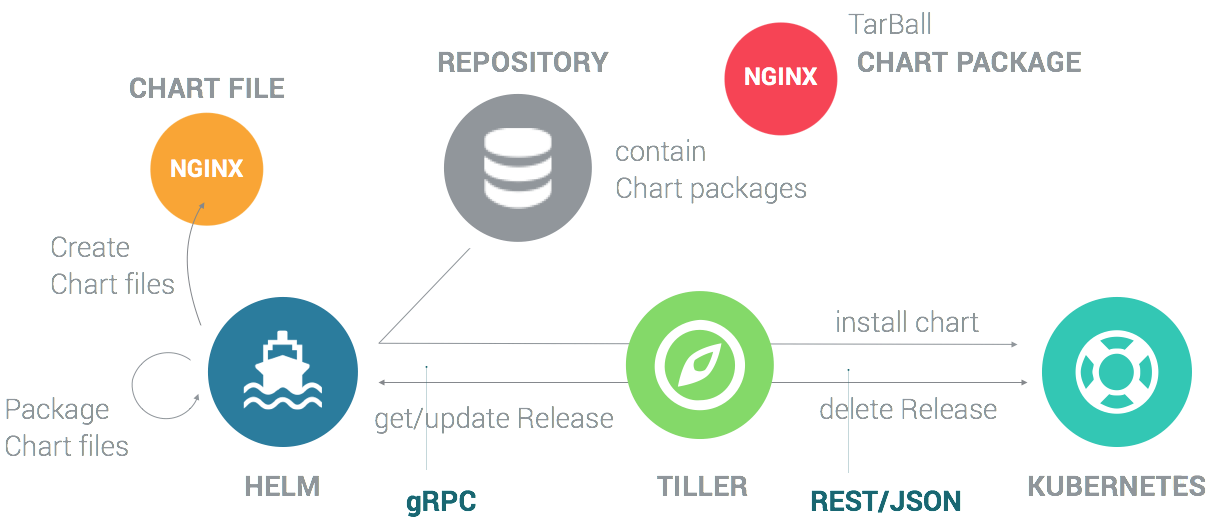
   Helm 2 is a client server model where the server called " tiller" is using to listen the requests from the helm client and pass it to the kubernetes cluster 


But in the helm 3 version the tiller component is removed and the helm client will directly communicative with the kubernetes cluster .


Helm contains mainly three components as below 

Chart - This is  a bundle of information necessary to create the instance of a kubernetes application
Config - The config contains configuration information which can be merged with chart to create a release object
Release - This is a running instance of a chart with specific config

A helm chart structure will be as below 

YOUR-CHART-NAME/
helmignore -> includes all the files which need to be ignored on chart 
 | 
 Chart.yaml -> all the information about your chart you are packaging
 | 
 values.yaml-> all the values need to be injected to the template
 | 
 charts/ -> This is the place where we will keep other chart details which is using in the main chart
 |
 templates/ This folder is where you put the actual manifest you are deploying with the chart. 
 For example you might be deploying an nginx deployment that needs a service, configmap and  secrets.  You will have your deployment.yaml, service.yaml, config.yaml and secrets.yaml all in the template dir. They will all get their values from values.yaml from above.

Now let's configure the Azure Kubernetes cluster with helm . Below are prerequisites needed for configuration 

Azure Cli installed in the local machine and Helm also installed locally . As i am configuring using the azure cloud shell helm is installed as default .

Type helm version 


Installing ACR ( Azure Container Registery) 

We need to create ACR for storing the images to run the applications using helm in AKS . So let's create  ACR named as unixchipsacr using below command 

az acr create --resource-group unixchipsrg1 --name unixchipsacr1 --sku basic


Creating AKS 


Next step is we have to create the AKS and attach the ACR . I am proceeding this task using portal as i am getting some error related to quota while using the cli method . You can refer the steps on my previous blog about creating the AKS using azure portal 

http://unixchips.blogspot.com/2019/07/azure-kubernetes-service-aks.html


To connect to this cluster using kubectl we have to get the credentials of the cluster unixchipsaks and same will be stored in /home/unixchips/.kube/config


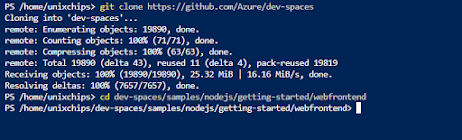
We have to clone the application from the GIT and navigate to the application directory 


Next step is to create a docker file as below 


We have to build and push the sample application to ACR 


Now we have to create the helm chart as below  we can see webfrontend directory is created under
the GIT repository downloaded locally and we can see helm structure under that webfrontend directory


We have to update the values.yml with the login server details of ACR which we created and change the service type as load balancer as below . We will get the login server details from the ACR portal


replicaCount: 1

image:
  repository: unixchipsacr1.azurecr.io/webfrontend
  pullPolicy: IfNotPresent
  # Overrides the image tag whose default is the chart appVersion.
  tag: ""

------------------output is omitted ---------------

service:
  type: LoadBalancer
  port: 80

*******************************************************

Install the helm chart as below 

helm install webfrontend webfrontend/


It takes a few minutes for the service to return a public IP address. Monitor progress using the kubectl get service command with the --watch argument.


If we try to access the application using external IP we can see the webpage as below 


So we have successfully configured the application using helm in AKS .

Thank you for reading and please post your comments 

Wednesday, June 9, 2021

Azure Kubernetes with Azure arc

This blog is about building azure AKS and configuring the same with Azure Arc. As we know AKS is the kubernetes platform build in with azure and Azure Arc is the architecture platform which will help us to manage hybrid and on premises resources as a better way.  

The basic architecture diagram and functionality details of the azure arc is given below 


From the diagram we can understand that Azure arc is a common platform which is used to manage hybrid/buildin server's, databases, containers . Anthos by Google and Azure Arc are examples of the control planes running the public cloud orchestrating and managing resources deployed in diverse environments. This investment is becoming key to delivering the promise of hybrid cloud and multicloud technologies. For example, a Linux VM deployed in Google Compute Engine (GCE) is managed by Azure. The logs and metrics from the VM are ingested into Azure Monitoring and Log Analytics. Similarly, BigQuery Omni, the multicloud flavor of BigQuery, can be deployed in AWS. Anthos can take control of Azure Kubernetes Clusters (AKS) and deploy workloads to it. All this is possible with the extension of the control plane and observability offerings.


Now let;s create an AKS cluster using azure CLI and configure it with Azure arc .

1. Let's create a resource group now using azure cli as below . we have created the resource group named as unixchipsrg2


2. Next step is to verify Microsoft.operationsManagement and Microsoft.operationalInsights are registered on your subscription as below . We can see that it is not registered from the below output 


3. Let's register the subscription with Microsoft.operationsManagement and Microsoft.operationalInsights using below command 


4. So we have registered the subscription with respective name spaces and now we have to create the AKS as below . The AKS name is unixchipsaks in the eastus region . This command will create a detailed output in jason format as below and i have omitted the output due to space constrain


output

***********************************************************************

PS /home/unixchips> az aks create --resource-group unixchipsrg2 --name unixchipsaks --node-count 2 --enable-addons monitoring --generate-ssh-keys

AAD role propagation done[############################################]  100.0000%{

  "aadProfile": null,

  "addonProfiles": {

    "omsagent": {

      "config": {

        "logAnalyticsWorkspaceResourceID": "/subscriptions/994b8397-cf9d-4f89-9aca-55b9313f9996/resourcegroups/defaultresourcegroup-eus/providers/microsoft.operationalinsights/workspaces/defaultworkspace-994b8397-cf9d-4f89-9aca-55b9313f9996-eus"

      },

      "enabled": true,

      "identity": {

        "clientId": "aec78f06-6bcb-4ed3-ba3a-e507fc79e48d",

        "objectId": "cf8fa808-c6e5-4258-8519-32a0a05f72cf",

        "resourceId": "/subscriptions/994b8397-cf9d-4f89-9aca-55b9313f9996/resourcegroups/MC_unixchipsrg2_unixchipsaks_eastus/providers/Microsoft.ManagedIdentity/userAssignedIdentities/omsagent-unixchipsaks"

      }

    }

  },

  "agentPoolProfiles": [

    ------------------output is omitted -----------------------------------------------------------------------

5. We have created a 2 node cluster called unixchipsaks and we have to connect to the cluster using kubectl command. If we are using azure cli kubectl is installed as default and we may need to install it separately if we are connecting from outside. Let's create the credentials inside the azure cli to connect to the kubernetes cluster 


6. We can check the kubernetes cluster status as below and both the nodes are ready for deployment 


7. Let's deploy an application in these nodes . We are using the application called azure-vote application and it contains a python application instance and a redis instance. So we have 2 deployments and service configurations . Let's merge both these deployments in a single yamal file as below 

***************************************************************************

apiVersion: apps/v1

kind: Deployment

metadata:

  name: azure-vote-back

spec:

  replicas: 1

  selector:

    matchLabels:

      app: azure-vote-back

  template:

    metadata:

      labels:

        app: azure-vote-back

    spec:

      nodeSelector:

        "beta.kubernetes.io/os": linux

      containers:

      - name: azure-vote-back

        image: mcr.microsoft.com/oss/bitnami/redis:6.0.8

        env:

        - name: ALLOW_EMPTY_PASSWORD

          value: "yes"

        resources:

          requests:

            cpu: 100m

            memory: 128Mi

          limits:

            cpu: 250m

            memory: 256Mi

        ports:

        - containerPort: 6379

          name: redis

---

apiVersion: v1

kind: Service

metadata:

  name: azure-vote-back

spec:

  ports:

  - port: 6379

  selector:

    app: azure-vote-back

---

apiVersion: apps/v1

kind: Deployment

metadata:

  name: azure-vote-front

spec:

  replicas: 1

  selector:

    matchLabels:

      app: azure-vote-front

  template:

    metadata:

      labels:

        app: azure-vote-front

    spec:

      nodeSelector:

        "beta.kubernetes.io/os": linux

      containers:

      - name: azure-vote-front

        image: mcr.microsoft.com/azuredocs/azure-vote-front:v1

        resources:

          requests:

            cpu: 100m

            memory: 128Mi

          limits:

            cpu: 250m

            memory: 256Mi

        ports:

        - containerPort: 80

        env:

        - name: REDIS

          value: "azure-vote-back"

---

apiVersion: v1

kind: Service

metadata:

  name: azure-vote-front

spec:

  type: LoadBalancer

  ports:

  - port: 80

  selector:

    app: azure-vote-front

**************************************************************************

8. save the above configuration in a yml file named as zure-vote.yml and pass it to the configuration as below 


9. We can monitor the progress as below and from the output the app is deployed successfully


10. we can connect to the app using the public IP 52.188.27.38 using port 80 as default 


Also the pods are running successfully


11. Next step is to configure the Azure arc with our cluster unixchipsaks. For that we have install the connectedk8s extension with the azure cli 


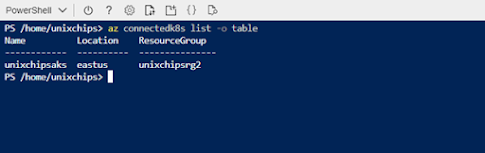
12. Let's register the existing AKS cluster with the azure arc as below. Please keep it in mind that the port number 443 and 9418 should be open to outside to connect to the azure arc 


14. If we check the azure portal-kubernetes-azure arc we can see that our cluster is succefully registered in the azure arc 


We can use the azure arc to manage /monitor and troublshoot kubernetes cluster and integrate it with GitOPS for centralized manifest management . I will explain those details in another post .

Thank you for reading ...